
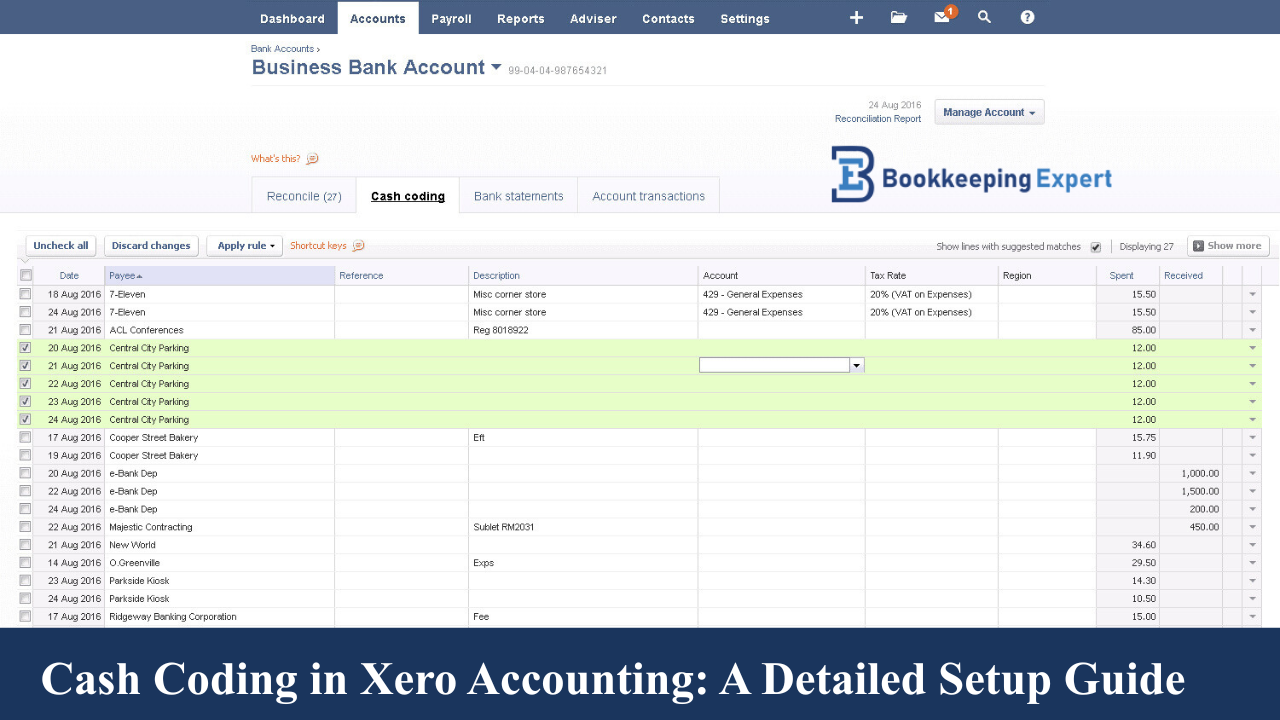
Xero Accounting is one of the leading cloud-based accounting platforms designed to help small and medium-sized businesses streamline their financial processes. One of its most powerful features is cash coding, which allows for efficient and accurate handling of bank transactions.
In this guide, we’ll explain how to set up cash coding in Xero, explore its benefits, and show how Bookkeeping Expert can help you get the most out of it.
What is Cash Coding in Xero?
Cash coding in Xero Accounting simplifies the process of reconciling multiple transactions at once. It’s especially useful for businesses that handle a high volume of bank transactions, enabling users to quickly assign cash codes, categorize expenses, and minimize manual data entry.
With cash coding, business owners can speed up bookkeeping while ensuring that all bank transactions are accurately classified.
How to Set Up Cash Coding in Xero Accounting
Setting up cash coding in Xero Accounting is simple. Follow these steps to start using it effectively:
1. Enable Cash Coding in Xero
Ensure that cash coding is enabled for your Xero account. This feature is typically available to users with the Xero Advisor role or bookkeepers with granted access.
Give Accountant Access: If you’d like your accountant to manage cash coding for you, invite them to your Xero account through user settings.
2. Navigate to Cash Coding
Go to the “Accounting” tab in Xero and select “Bank Accounts.”
Choose the bank account you want to reconcile and then click the “Cash Coding” tab.
3. Categorize Transactions
In the cash coding screen, you’ll see a list of unreconciled transactions. Here, you can:
-
Add descriptions
-
Select the correct cash codes
-
Categorize transactions efficiently
Pro Tip: You can also use cash coding for inter-bank transfers, which helps simplify internal cash flow management.
4. Save and Reconcile
After categorizing all transactions, save and reconcile them in one go to ensure your bank feeds are up to date.
Benefits of Using Cash Coding in Xero Accounting
Speed and Efficiency
Cash coding significantly accelerates reconciliation by allowing you to categorize multiple entries simultaneously.
Improved Accuracy
Bulk reconciliation reduces manual errors, ensuring more accurate financial data.
Streamlined Processes
Cash coding simplifies categorization for recurring transactions, making bookkeeping faster and more consistent for small business owners.
Cash Coding and Xero Accounting for Different Sectors
Xero Accounting is versatile and suits various industries. Here’s how different sectors benefit from cash coding:
-
Nonprofits: Maintain accurate records of donations, grants, and operational expenses.
-
Restaurants: Quickly classify daily sales, purchases, and expenses.
-
Farming & Manufacturing: Organize diverse transactions to simplify financial tracking.
Xero Accounting vs. Other Platforms
When comparing Xero Accounting vs. Sage 50 or other software, Xero stands out for its intuitive interface and efficient cash coding tools.
It also integrates seamlessly with platforms like Gusto for payroll, allowing small business owners to manage both finances and HR from one dashboard.
How Bookkeeping Expert Can Help You with Cash Coding in Xero
Setting up and optimizing cash coding requires expertise to ensure accurate transaction categorization. That’s where a Bookkeeping Expert can help.
-
Certified Xero Advisors: Our team includes experienced Xero-certified advisors who handle everything from setup to ongoing support.
-
Training & Support: We offer Xero Accounting Training and Courses to help you understand Xero’s features, including cash coding.
-
Troubleshooting & Optimization: Facing issues like Xero Accounting Not Working? Our experts resolve technical problems, streamline workflows, and optimize your Xero setup — including bank feeds and cash coding.
Conclusion
Cash coding in Xero Accounting is a powerful feature that streamlines transaction reconciliation, saves time, and enhances financial accuracy.
Whether you’re new to Xero or looking to improve your current bookkeeping system, Bookkeeping Expert can help you implement, optimize, and maintain your Xero setup for maximum efficiency.
Ready to simplify your bookkeeping with Xero?
Contact Bookkeeping Expert today and discover how our team can help you make the most of Xero Accounting.
